Flash sale
SAVE 10%


Written by
Jacob
Track the team’s productivity on Linux just like you do on Windows and Mac.
MaxelTracker has been helping teams monitor productivity and manage remote work on Windows and macOS. But we know many teams also use Linux, especially developers, IT professionals, and tech teams. That’s why we’re happy to announce that MaxelTracker is now available for Linux in Beta.
With this release, your Linux users can now enjoy the same features you already use on other platforms. From time tracking and app usage to screen monitoring and activity reports, everything is now supported on Linux too.
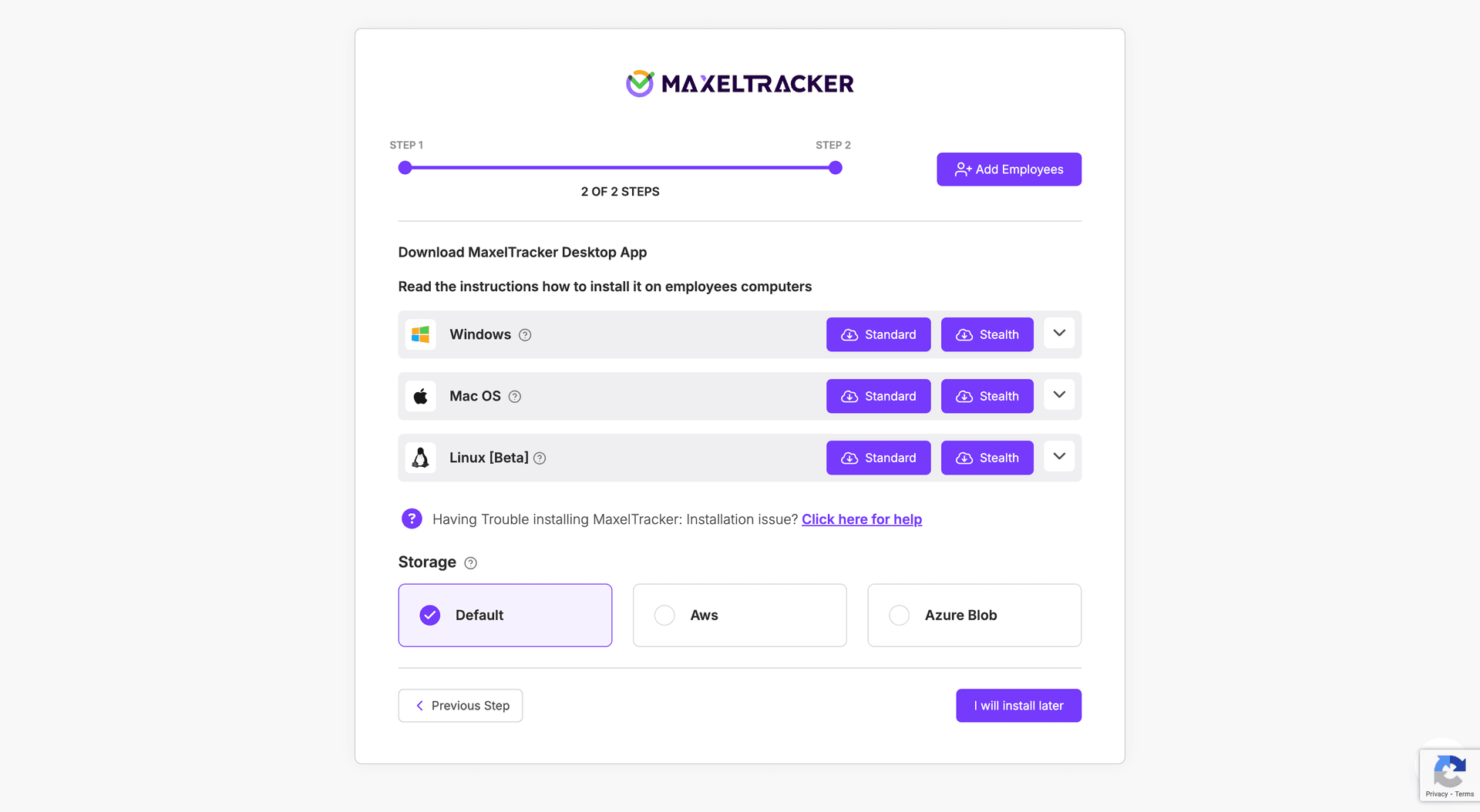
Since Linux systems work differently from Windows and Mac, the installation process is also a bit different. But it’s simple and takes just a few steps.
Step 1: Update your system and install the required tool
Open your terminal and run the following commands one by one:
sudo apt update
sudo apt install xdotool
This step ensures your system has everything needed for MaxelTracker to run properly.
Step 2: Install MaxelTracker from your download folder
Navigate to the folder where the MaxelTracker .deb file is saved. Then run this command:
sudo apt install ./Maxel-Tracker-linux.deb
Once installed, you can find MaxelTracker in your Applications menu, just like any other software.
The Linux Beta version gives you access to all the core features of MaxelTracker. These include:
Real-time activity tracking: See when users are active, idle, or locked.
Time tracking: Track the number of hours employees spend working on tasks while using specific apps
Application and website usage: Find out which apps and sites are being used most.
Screenshot monitoring: View regular screenshots of the work in progress.
Location tracking: Know where users are working from, in real time.
Dashboard sync: All Linux data is synced to your MaxelTracker admin panel with no extra setup.
Many teams have a mix of operating systems across their company. Now with Linux support, you no longer need to leave anyone out. Whether someone is coding on Ubuntu, managing servers on Debian, or just prefers a Linux workflow, MaxelTracker will now track and report their work activity just like it does for other platforms.
This also helps team leads and managers view productivity across all employees in one place, regardless of which OS they use.
The Linux version is now available in Beta for all MaxelTracker users. If your team includes Linux users, you can now install the app and begin tracking activity without delay.
Signup with MaxelTracker and Download the Linux build
👉 Explore our pricing plans and features to find the perfect solution for your team’s productivity needs! 🚀